I Built a Windows Agent That Doesn’t Trust the AI
I Built a Windows Agent That Doesn’t Trust the AI
Most AI agents I see are good at one thing: generating an answer.
I wanted to build something different.
I wanted an AI system that could actually use a Windows computer — open applications, search the web, interact with websites, read files, control windows, and execute real tasks.
But there was one rule:
I don't want to trust the AI with my computer.
That became the core idea behind WinAI-OE — Windows AI Operating Environment.
Why I started building this
The interesting part of an AI agent isn't just understanding a prompt.
It's what happens after the model says:
"I'll do it."
If an LLM can directly execute commands, delete files, send emails, submit forms, or control applications, a bad model response can become a real system-level problem.
So I separated the system into two different worlds:
AI decides what it thinks should happen.
The security core decides what is actually allowed to happen.
The AI is an untrusted component.
The Windows execution layer is controlled by deterministic policies.
The first thing I wanted to prove
I didn't want to build a demo where the agent just moves a mouse around.
I wanted to give it actual tasks.
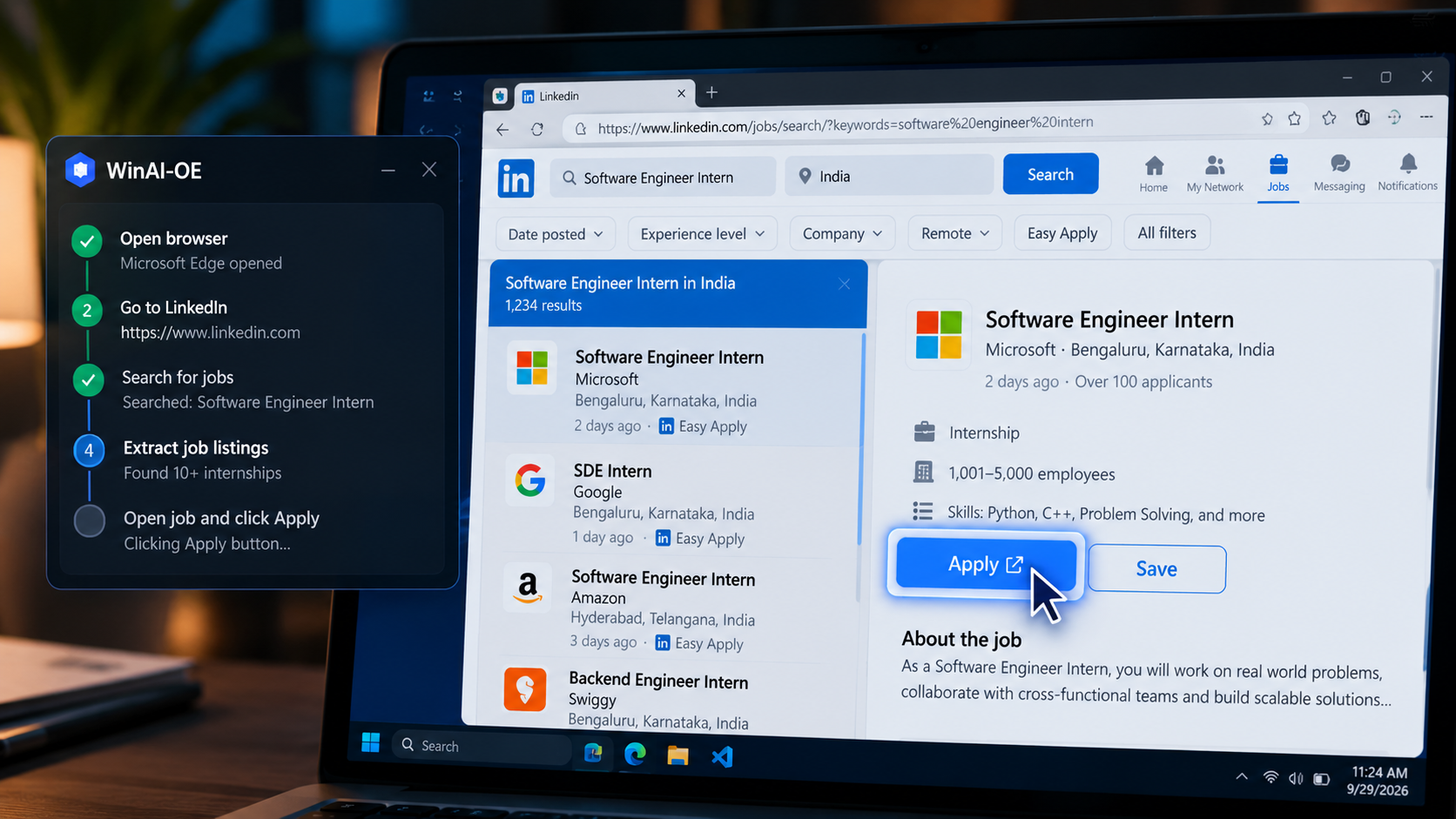
One of the first workflows I tested was job searching.
The agent can:
- Open the browser.
- Navigate to LinkedIn.
- Search for relevant jobs.
- Read the page.
- Extract job information.
- Navigate through the application flow.
- Fill information when permitted.
- Stop and ask for approval before sensitive actions.
The important part isn't that it can click an Apply button.
The important part is that the button click passes through the system's control layer before the action reaches Windows.
Then I tried something completely different
I wanted to see whether the architecture was tied only to job applications.
So I tested another real-world workflow:
Booking movie tickets.
The agent can open the browser, navigate through the booking flow, understand the page, select the required options and reach the point where an actual transaction would happen.
But purchasing isn't something I want an LLM to silently decide.
That's where approvals become important.
The AI can say:
"The movie, theatre and seats are selected. The next action will make a purchase."
The security layer can then require:
USER APPROVAL → EXECUTE
The model doesn't get to override that decision.
The interesting part is the security architecture
I didn't want security to be a prompt saying:
"Please be careful."
That's not security.
The security layer needs to exist outside the model's reasoning.
WinAI-OE uses a security core that sits between the AI and the operating system.
The basic flow looks like this:
User → AI → Action Proposal → Policy Engine → Validation → Approval (if required) → Windows Execution → Audit
The model can suggest an action.
It cannot simply execute whatever it wants.
Zero Implicit Trust
Every action is evaluated before execution.
The policy engine can make decisions such as:
ALLOWDENYREQUIRE_APPROVAL
For example:
Reading a webpage might be allowed.
Opening a whitelisted application might be allowed.
Running a terminal command can require approval.
Deleting a file can require approval.
Submitting an application can require approval.
Deploying a project can require approval.
The important distinction is that these decisions don't depend entirely on what the LLM says.
Giving an AI access to Windows is harder than it looks
Windows isn't just a browser.
A real desktop has:
- Applications
- Windows
- Processes
- Files
- System resources
- Browser tabs
- UI controls
- Keyboard input
- Mouse interaction
- URLs
- Permissions
So I built different capabilities around the Windows environment.
The agent can inspect windows and controls, focus applications, read control text, send keystrokes, invoke controls and interact with supported applications.
It can also inspect system information such as:
- Running processes
- Memory
- Disk usage
- Windows
- Application state
That makes it much closer to an operating environment agent than a simple browser automation script.
The AI is not the security boundary
This was probably the most important design decision.
A common architecture is:
LLM → Tool → Execute
I wanted:
LLM → Intent → Security Core → Execute
That difference matters.
The LLM can hallucinate.
The LLM can misunderstand a page.
The LLM can generate the wrong command.
The LLM can make a bad decision.
The execution layer should still be able to say:
No.
I also wanted the system to learn from mistakes
Agents will make mistakes.
Instead of pretending they won't, I added a mistake-learning layer.
When something goes wrong, the system can store useful information about the failure and retrieve it during future reasoning.
For example:
Previous attempt:
Clicked the wrong control because two UI elements had similar labels.
Lesson:
Verify the control's role and surrounding context before invoking it.
The next execution can use that information instead of blindly repeating the same mistake.
This is where the agent starts becoming more interesting.
It isn't just remembering conversations.
It's building a history of execution mistakes and corrections.
Security also means knowing what happened
Every important action should leave evidence.
The system maintains audit information around execution.
That makes it possible to answer questions like:
- What action did the agent request?
- Why was it allowed?
- What policy was applied?
- Did the user approve it?
- What actually executed?
- What happened afterward?
For an automation system that can interact with a real computer, this matters much more than simply showing a successful demo.
Hardware-anchored secrets
Another problem appears when an agent starts interacting with real systems:
credentials.
I don't want plaintext secrets sitting around on disk just because an AI application needs access to something.
The system uses Windows security mechanisms to protect sensitive data and avoids storing plaintext keys directly on disk.
The goal is simple:
Even if the AI knows how to request an action, it shouldn't automatically get access to the underlying secrets.
What I've actually learned building this
The hardest part wasn't getting an LLM to understand instructions.
That part is relatively easy now.
The difficult part is controlling what happens after the model understands them.
Building this forced me to think about AI from a different perspective.
Not:
"How intelligent can I make the agent?"
But:
"How much damage can the agent cause when it is wrong?"
That changes the architecture completely.
Where WinAI-OE is going
The goal isn't to build another chatbot that can click buttons.
I want WinAI-OE to become a controlled execution environment for AI on Windows.
An environment where different AI models can act as reasoning components, while the operating system interaction remains governed by an independent security layer.
The model can change.
The policies don't have to.
The model can make mistakes.
The execution layer can still stop them.
And sensitive actions can still require a human.
That's the direction I'm exploring with WinAI-OE.
AI should be capable enough to act — but not trusted enough to act without control.